
Aliens Fireteam Elite 2 First Person Guide
Does Aliens Fireteam Elite 2 have first person mode? This page separates confirmed third-person presentation from unverified camera options and settings.
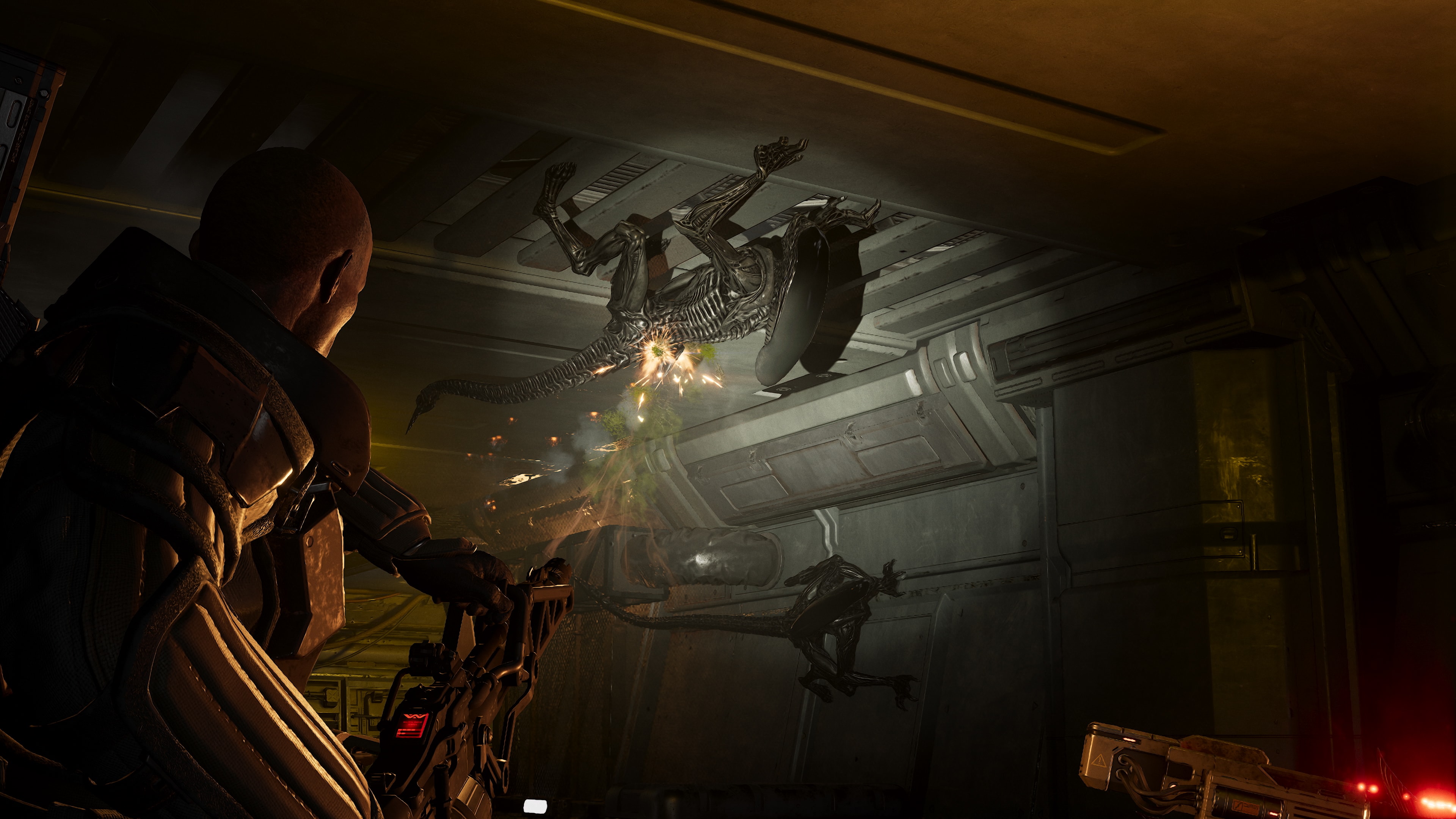
Does Aliens Fireteam Elite 2 have a first person mode? The collected storefront and official material present it as a third-person co-op shooter. No source in the collected pack confirms a first-person toggle, first-person weapon view, or camera setting, so those features are unverified.
Confirmed presentation
Steam’s collected store data includes third-person among the game’s tags, and the official screenshots and trailers show the Marine from behind. The homepage emphasizes four-player co-op, classes, weapons, and Horde rather than a camera-mode option. That is enough to describe the default presentation as third person.
Third-person presentation does not automatically rule out a later toggle or accessibility camera. It only means the current collected material does not document one. Avoid copying a forum claim as a confirmed feature without a menu screenshot or official note.
What a first-person test would need to show
A valid confirmation would show a camera option in the settings menu or a repeatable in-game toggle that changes the player view. Record whether the reticle, weapon model, reload animation, melee interaction, and cover behavior change. A close camera angle or trailer cut is not enough to prove first person.
If a future patch adds the option, document its name, supported modes, field of view, motion settings, and whether all classes and weapons support it. Until those fields are observed, keep them unverified. This prevents camera speculation from becoming a false buying guide.
Camera settings that are separate
Field of view, camera shake, motion blur, chromatic aberration, and third-person distance are not the same as a first-person mode. The collected settings article recommends disabling motion blur and chromatic aberration for its own low-lag setup, but it does not establish a first-person option. A player can prefer a clearer third-person view without changing the game’s camera perspective.
When writing settings advice, name the exact menu option and keep visual comfort recommendations separate from feature claims. If a setting is absent on one platform, record that platform rather than generalizing. Any undocumented camera slider is unverified.
Why the distinction matters in co-op
Class readability, ally positioning, and awareness of threats behind the player are part of a third-person squad shooter’s information flow. A first-person toggle could change aiming, visibility, and close-range perception, but the collected sources do not measure those differences. Do not promise that a camera change will improve damage, accuracy, or immersion.
The official class showcases show named weapons such as the Smartgun, Pulse Rifle, shotgun, railgun, and plasma weapons from a third-person perspective. They do not expose a first-person weapon model. The exact camera behavior of each item remains unverified.
Current answer
Plan to play Aliens Fireteam Elite 2 as a third-person shooter. A first-person mode is not confirmed by the collected official or storefront material, and there is no verified camera toggle to recommend. Recheck the settings menu and patch notes after major updates, then replace the unverified label only with direct evidence.
The presentation evidence comes from the Steam store listing and official game homepage. The collected settings reference is Destructoid’s guide, which does not confirm a first-person feature.
Related Articles
start-here
Aliens Fireteam Elite 2 Demo Status Guide
Is there an Aliens Fireteam Elite 2 demo? Check the current official launch and store evidence here; a public demo listing is not confirmed.
start-here
Aliens Fireteam Elite 2 Steam Deck Guide
Check the current Aliens Fireteam Elite 2 Steam Deck evidence, including SteamDB flags and compatibility clues; performance remains unverified.
co-op
Aliens Fireteam Elite 2 Crossplay Guide 2026
Use this Aliens Fireteam Elite 2 crossplay guide for supported platforms, invitations, voice chat, and progress questions; save limits remain unverified.
Was this helpful?
Thanks for the feedback!